
TakuTāone MyChristchurch is an online platform that makes it easier to manage your rates, keep your data up to date and interact with Christchurch City Council online. Find out how to access it and what it offers below.
Manage your rates
Managing your rates is easier with MyChristchurch. You can take control of your rates information and get what you need, when you need it, including:
- viewing your payment and transaction history
- updating the contact details for your property
- checking your current balance and due dates
- viewing and downloading previous invoices
- setting up a direct debit online – no paper form required.
How to access MyChristchurch
MyChristchurch is a web application (progressive web app) accessible from mobile phones, laptops or PCs using a web browser. It includes two-factor authentication to protect privacy and ensure our online services are secure.
Log in to MyChristchurch(external link)
If you don't already have a MyChristchurch account, it's easy to create one.
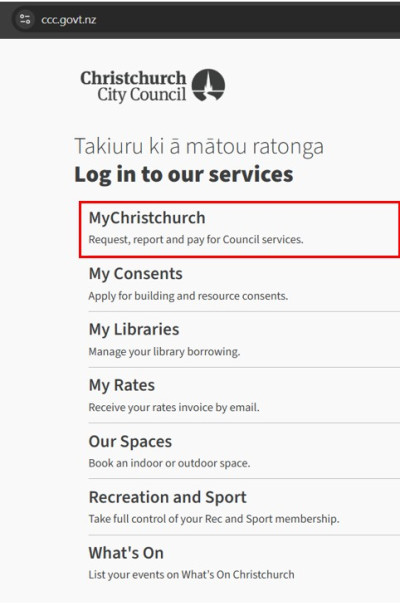
1. Select MyChristchurch from the log in menu
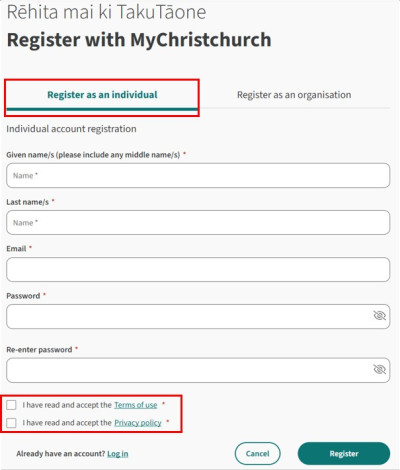
- Select New User? Register Now,
- Select As an individual and complete the fields. Use your legal name as it appears on your rates invoice.
- Your password must be at least 12 characters long, include both upper and lower case letters, a number and a symbol.
- Tick the Terms of Use and Privacy Policy boxes
- Select Register.
The next screen will ask you to provide your phone contact details, date of birth and preferred contact method.
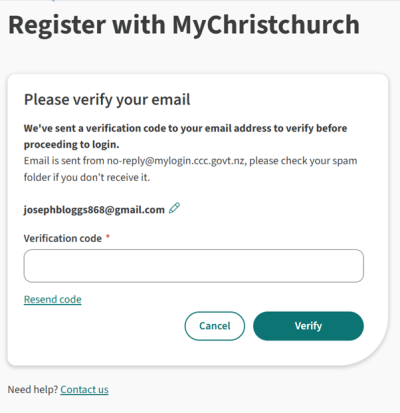
Once you submit your registration, a verification code will be sent to the email address you provided.
2. Verify your email
Enter the verification code sent to your email and select verify.
3. Secure your account
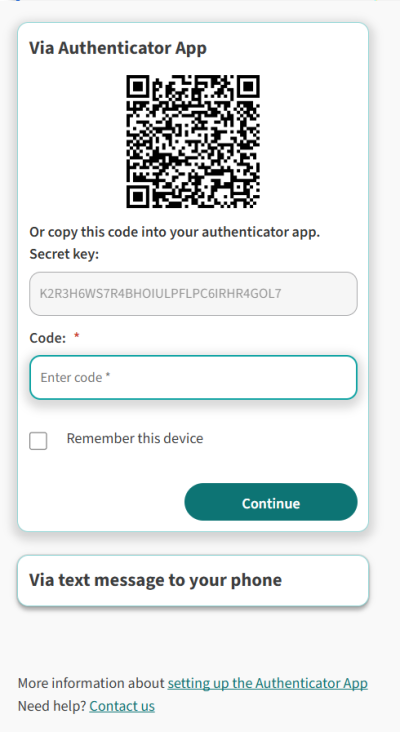
Setting up two-factor authentication for your online account adds an extra layer of security, significantly reducing the risk of unauthorised access.
You can use your mobile phone to secure your account, or an authenticator app.
To use your mobile phone:
- Select Via text message to your phone to add your mobile phone number.
- Choose whether you want to get the code via text (SMS) or voice message.
- Enter the code you received and select continue.
- To use an authentication app, scan the QR code using either the app or your phone’s camera.
- Enter the code and select continue.
1. Select MyChristchurch from the log in menu
- Select New User? Register Now,
- Select As an individual and complete the fields. Use your legal name as it appears on your rates invoice.
- Your password must be at least 12 characters long, include both upper and lower case letters, a number and a symbol.
- Tick the Terms of Use and Privacy Policy boxes
- Select Register.
The next screen will ask you to provide your phone contact details, date of birth and preferred contact method.
Once you submit your registration, a verification code will be sent to the email address you provided.
2. Verify your email
Enter the verification code sent to your email and select verify.
3. Secure your account
Setting up two-factor authentication for your online account adds an extra layer of security, significantly reducing the risk of unauthorised access.
You can use your mobile phone to secure your account, or an authenticator app.
To use your mobile phone:
- Select Via text message to your phone to add your mobile phone number.
- Choose whether you want to get the code via text (SMS) or voice message.
- Enter the code you received and select continue.
- To use an authentication app, scan the QR code using either the app or your phone’s camera.
- Enter the code and select continue.
Follow these three simple steps to get your rates invoices by email:

1. Register for MyChristchurch
To register for MyChristchurch, you will need to use your legal name as it appears on your rates invoice, your date of birth and your postal address.
2. Add a property
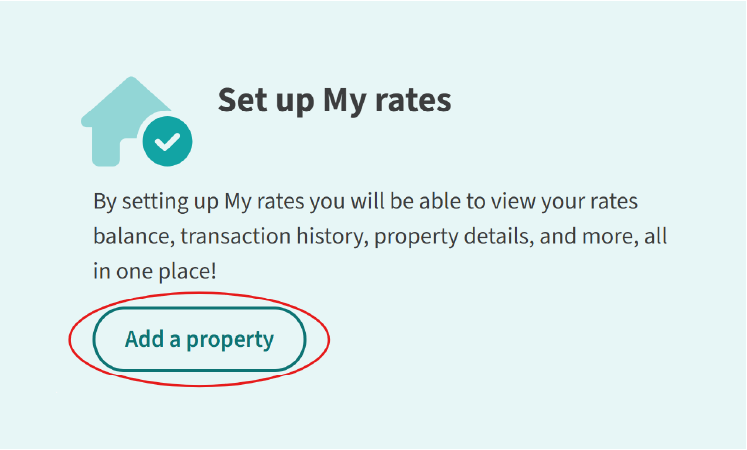
Go to 'Set up My rates' and select 'Add a property' to link to your property.
You will need to have your latest rates invoice for the property available for reference.
3. Select email delivery
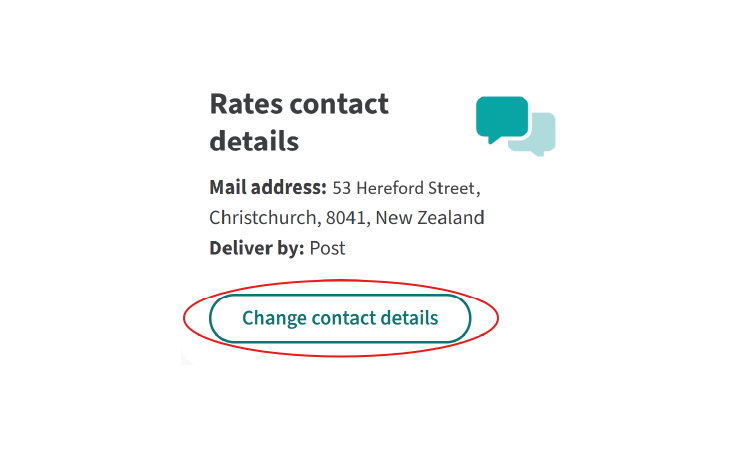
Select 'change contact details' and select email delivery.
You can also update the postal address for this property, as this may be used for other postal notices, or if we can't contact you by email.
Please note that both the postal address and email contact details for your property will be visible to all ratepayers, owners and administrators for this property within MyChristchurch.
1. Register for MyChristchurch
To register for MyChristchurch, you will need to use your legal name as it appears on your rates invoice, your date of birth and your postal address.
2. Add a property
Go to 'Set up My rates' and select 'Add a property' to link to your property.
You will need to have your latest rates invoice for the property available for reference.
3. Select email delivery
Select 'change contact details' and select email delivery.
You can also update the postal address for this property, as this may be used for other postal notices, or if we can't contact you by email.
Please note that both the postal address and email contact details for your property will be visible to all ratepayers, owners and administrators for this property within MyChristchurch.
Receive your rates invoice by email
If you have questions or problems registering, please contact us.
You can see when your next kerbside collection is due and which bins you need to put out, by property.
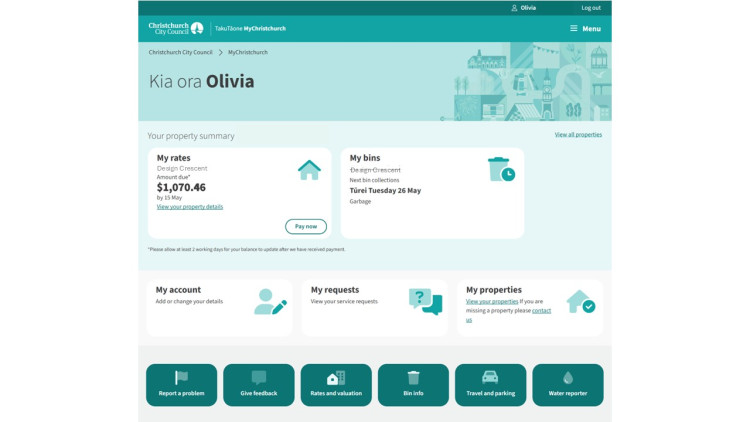
You can update your account details online anytime, including the contact preferences for your property.
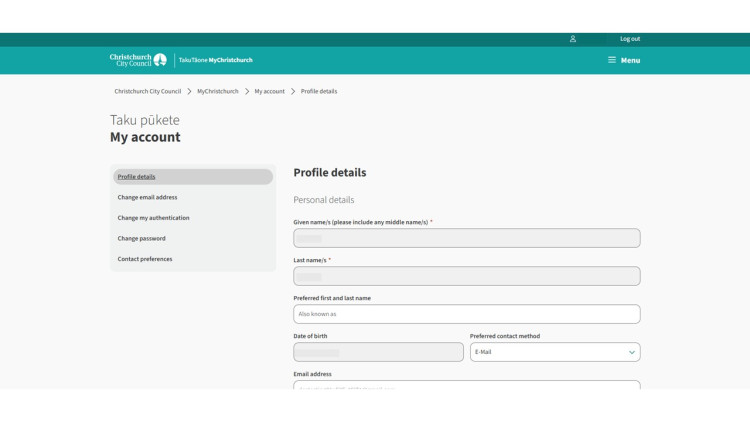
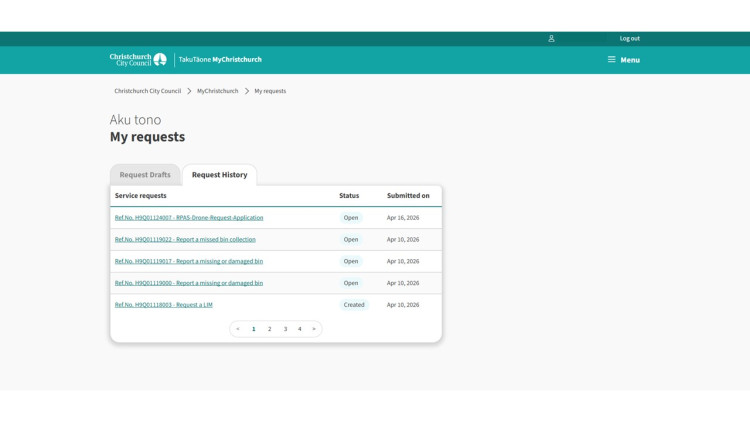
You can view service requests you've created online.
You can also pay other Council bills, including:
- Building consents
- Landfill charges
- Cemetery fees
- Dog registration
- Drainage plans
- Excess water rates
- Infringements (excluding parking)
- LIM
- Property files
- Property rates (incurs a surcharge)
- Resource consent
- Trade waste
- Water connection
- Wheelie bin exchange or reinstatement
Log in to MyChristchurch to get started